TranzPort Quote

“An amazingly useful tool! I had the TranzPort running 5 minutes after taking it out of the box. Once I started using it, I was hooked.”

Bruce Ennis, SONAR user

Quick Facts

  • Wireless DAW control: operate your computer-based digital audio workstation from anywhere in your studio
  • Compatible with Mac® and Windows®
  • Supports Pro Tools®, Logic®, Cubase®, Digital Performer®, Sonar™ and other DAW software applications
  • Two-way interface: get timecode position, track name/number, track volume, pan settings and more via backlit LCD display and LED indicators
  • Uses high-frequency RF technology: no wires or line-of-sight required, and no added interference
  • Dedicated buttons for often-used functions, including transport controls, marker/locate buttons, track control (level, pan, solo, mute, record arm) and more
  • Operates on AA batteries
  • Small, lightweight design
  • Footswitch input
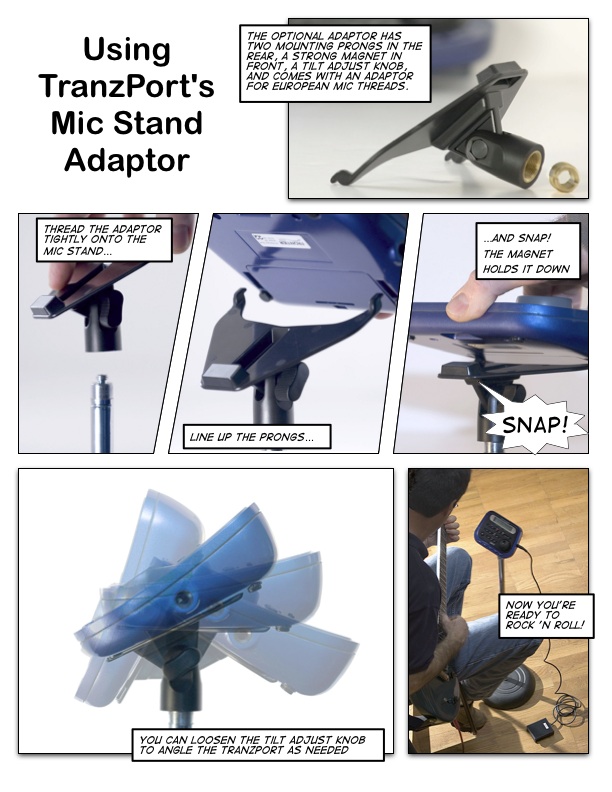
  • Microphone stand mount, custom padded carrying bag, and standard footswitch are available from the on-line store
Pro Audio Review PAR Excellence Award Mix Certified Hit Award EQ Exceptional Quality Award Special Innovation Award Keyboard Key Buy Electronic Musician 2006 Editors Choice 2006 EEC Award Nominee 2007 Remix

TranzPort and Sony’s Vegas 7

Vegas Window

Video editors take note, Sony’s powerful HD video and audio editing software, Vegas 7, now has full “Native Mode” support for TranzPort, the world’s first wireless DAW. The portable, compact design of TranzPort, and the editing power of Vegas come together to make an unbeatable combination for professionals on the move.

“Native Mode” support of TranzPort is quick to set up, and easy to use. Simply enable the TranzPort as a MIDI Playback and Input device on the MIDI Preferences tab, add the TranzPort from the list of “Available Devices” on the External Control & Automation tab, and enable External Control under the Options menu. That’s it, you are ready to go. No extra programming needed.

Vegas Setup 1

Vegas Setup 2

There are 2 PDF documents created specifically for Vegas 7 users available from the FDG website. The first is Vegas_7_and_TranzPort. This document contains detailed instructions for configuring the TranzPort for use with Vegas 7. Information on how to use some of TranzPort’s less-obvious features and a reference chart listing the default controls for Vegas 7 are found in this useful document as well.

The second file, Vegas_7_Layout, is a single page picture of the TranzPort with overlaid text also summarizing the Vegas 7 feature set. It may be helpful to print this file and have it handy as a quick reference guide. Both of these documents, along with the TranzPort User’s Guide, are available in the TranzPort Downloads area of this web site.

We encourage visitors to our user forums to post their comments and questions. Other users often have useful ideas and experiences to share, and we monitor the posts to provide additional input.

Below are other TranzPort related links that may be useful:

Copyright © 2005 Frontier Design Group